
Git is the version control system used by virtually every modern software development team, but the tool itself prescribes nothing about how you should use it. Over the past fifteen years, several distinct workflow models have emerged to fill that gap — each with clear use cases, real trade-offs, and predictable failure modes. Understanding which workflow fits your team's size, release cadence, and deployment model is one of the most consequential structural decisions a development team makes.
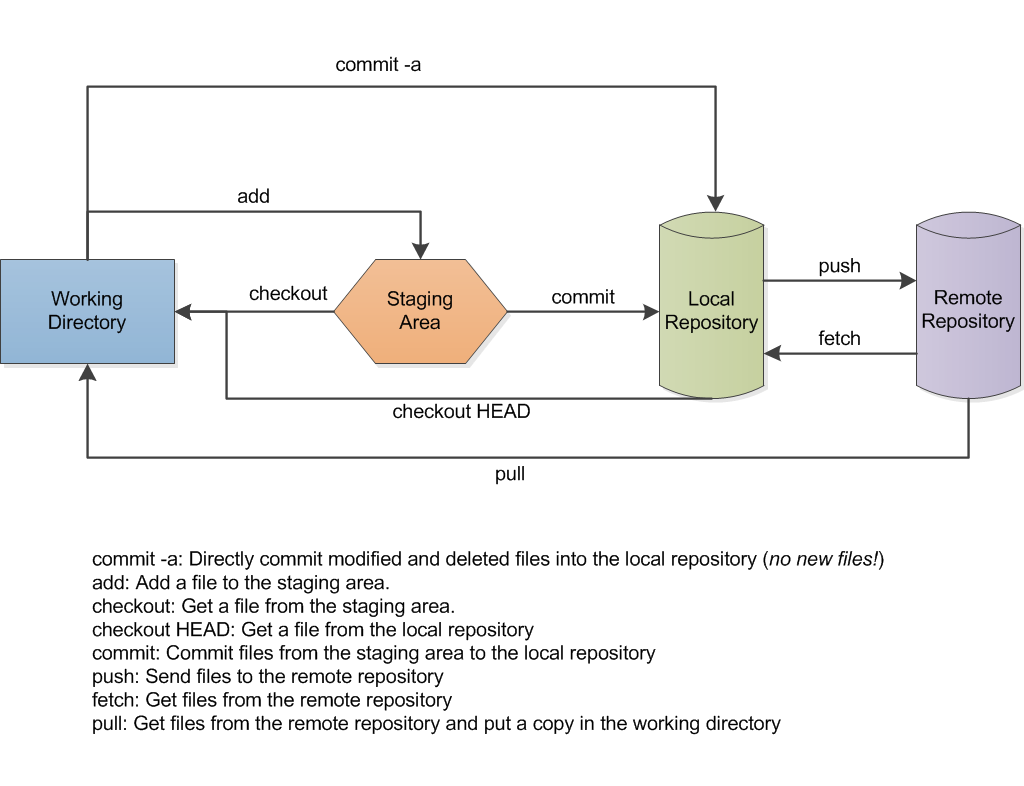
Image: Git data flow — Lbhtw (CC BY-SA 3.0), via Wikimedia Commons
What Is a Git Workflow?
A git workflow is a shared convention for how branches are created, named, merged, and deleted — and what each branch represents in the software delivery lifecycle. Without a shared workflow, teams consistently encounter the same set of problems: merge conflicts that take hours to untangle, unclear code ownership, deployments that race ahead of reviews, and release-day scrambles caused by integration failures discovered too late.
There is no single correct git workflow. The best choice depends on your team size, how frequently you deploy, whether you need to maintain multiple live release versions simultaneously, and how mature your CI/CD pipeline infrastructure already is. Choosing a workflow is as much about organizational constraints as it is about technical preference.
GitFlow: Structured Branching for Scheduled Releases
GitFlow was introduced by Vincent Driessen in January 2010 in a widely-read blog post titled "A successful Git branching model." It defines a rigid branch hierarchy with two permanent branches — main (or master) and develop — and three categories of supporting branches: feature branches, release branches, and hotfix branches.
How it works:
- All new features are developed in feature branches cut from
develop - When features are ready for a release cycle, a release branch is cut from
developfor final stabilization and testing - The stabilized release branch is merged into both
main(with a version tag) and back intodevelop - Critical production bugs are addressed in hotfix branches off
main, then merged back to bothmainanddevelop
Best for: Teams that ship versioned software on a schedule — mobile apps, firmware, libraries with semantic versioning, or enterprise software with defined release windows. GitFlow shines when you need to maintain multiple production versions simultaneously (e.g., v2.x patch releases while v3.x is in active development).
Challenge: GitFlow creates overhead that significantly slows teams who deploy continuously. Driessen himself later updated the original post to note that the model is not ideal for software that is continuously delivered — a candid acknowledgment that its use case is specific and that applying it outside that context creates drag without benefit.
GitHub Flow: Simple and Deployment-Focused
GitHub Flow, documented by Scott Chacon in 2011, is a deliberate simplification: one permanent branch (main), and every change — features, bug fixes, experiments — lives in a short-lived branch that is reviewed via pull request and merged directly to main upon approval. Deployment happens from main, continuously.
How it works:
- Branch off
mainfor any change, giving the branch a descriptive, specific name - Open a pull request early — even before the work is complete — to create visibility and invite feedback
- Deploy the branch to a preview or staging environment before merging, if your infrastructure supports it
- Merge to
mainafter approval; the merged state of main is deployable at any time
Best for: Web applications with continuous delivery, SaaS products, and teams that can deploy multiple times per day. GitHub Flow works best when there is only one version of the product in production at any given time.
Challenge: Maintaining multiple production versions — supporting v2.x and v3.x in parallel, for instance — is not naturally supported by GitHub Flow. Teams that encounter this need often end up grafting release branches onto the model ad hoc, which is essentially partial GitFlow without the ceremony.
Trunk-Based Development: Maximum Velocity, Maximum Discipline
Trunk-based development (TBD) takes simplification one step further: all developers commit directly to a single shared branch (the "trunk," typically main), usually at least once per day. Feature branches, when used at all, are kept extremely short-lived — hours, not days or weeks. What controls user-facing feature availability is not branch state but feature flags deployed to production.
TBD is the workflow most closely associated with high-performing engineering organizations in the DORA (DevOps Research and Assessment) research program. DORA's multi-year research tracking engineering performance across thousands of organizations annually consistently finds that teams practicing trunk-based development have faster lead times for changes and higher deployment frequencies than teams using long-lived feature branches. The research does not argue that TBD causes high performance — rather, that it is one component of a cluster of practices high-performing teams tend to share.
Best for: Mature teams with high automated test coverage, robust CI/CD pipelines, and feature flag infrastructure. Scale-stage engineering organizations like Google, Meta, and Shopify use variants of trunk-based development for their core codebases.
Challenge: TBD requires genuine discipline: every commit to the trunk must leave the codebase in a releasable state. Without strong test coverage and CI gates enforced on every commit, a bad push can immediately affect every engineer working from the shared branch. Feature flag infrastructure adds operational overhead that smaller teams may not yet need or have the capacity to maintain.
GitLab Flow: A Pragmatic Middle Ground
GitLab Flow, defined in GitLab's official documentation, bridges the gap between GitHub Flow's simplicity and GitFlow's support for multiple environments. It pairs feature branch development with environment-specific branches that mirror deployment targets directly.
How it works:
- Feature branches merge into
mainafter pull request review mainmerges into astagingbranch when ready for integration testingstagingmerges intoproductionafter validation in the staging environment- For versioned releases, dedicated release branches are maintained to support cherry-picking of urgent production fixes
Best for: Teams deploying to multiple named environments (development, staging, production) or needing partial support for release versioning, without adopting GitFlow's full branch hierarchy. GitLab Flow also integrates naturally with GitLab CI/CD pipelines, where environment branches can trigger specific deployment jobs automatically.
Comparing the Four Major Workflows
| Workflow | Branch Complexity | Ideal Deployment Cadence | Multi-Version Support |
|---|---|---|---|
| GitFlow | High | Scheduled / monthly | Yes (release branches) |
| GitHub Flow | Low | Continuous / daily | No |
| Trunk-Based Dev | Very Low | Continuous / multiple daily | Via feature flags only |
| GitLab Flow | Medium | Continuous with environment staging | Partial (release branches) |
Common Mistakes Regardless of Workflow
The same failure patterns appear in teams using every workflow model:
- Long-lived feature branches: Branches that survive for weeks accumulate integration debt and merge conflicts. Most workflows perform best when branches live no longer than 1–2 days. The longer a branch lives, the more painful the eventual merge becomes.
- Treating pull requests as a rubber stamp: PR reviews serve two purposes: catching problems and spreading knowledge about what changed and why. Teams that approve PRs within minutes without genuine review lose the knowledge-transfer benefit entirely.
- No branch protection on main: An unprotected main branch that allows direct pushes without review creates a single point of human error at the most critical place in the codebase. Branch protection rules are table stakes, not optional.
- Applying the wrong workflow to the wrong context: GitFlow applied to a continuously deployed SaaS product creates substantial overhead without providing any of its intended benefits — the release branch structure exists to support versioned releases, which the team is not doing.
- Inconsistent enforcement: A workflow that engineers follow only when they remember to provides little of the coordination benefit. Enforcement should come from branch protection rules, required CI status checks, and PR templates — not from developer memory alone.
Frequently Asked Questions
Which git workflow is best for a small startup team?
GitHub Flow is almost always the right choice for early-stage teams. It has minimal overhead, aligns naturally with pull-request-based code review, requires no special branching infrastructure, and scales reasonably as the team grows. Save the complexity of GitFlow for when you genuinely have multiple live release versions to support simultaneously — which most early-stage products do not.
Can we switch workflows later without major disruption?
Yes, and teams often do evolve their workflow as they scale. The most common migration is from GitFlow toward GitHub Flow or toward trunk-based development as continuous deployment infrastructure matures. The transition requires cleaning up long-lived branches, updating CI/CD pipeline configurations, and reaching explicit team agreement on naming conventions and branch protection rules. Most teams can complete this migration in 2–4 weeks without requiring a full sprint freeze or feature moratorium.
Do we need feature flags if we use trunk-based development?
For teams committing directly to trunk and deploying continuously to production, feature flags are effectively required infrastructure. They let you merge incomplete features safely, run controlled rollouts, and perform A/B experiments without branching for each variant. Without them, every commit to trunk immediately reaches all users. Open-source tools like Flagsmith and Unleash provide solid feature flag infrastructure for teams of any size without the cost of commercial alternatives like LaunchDarkly.
Bottom Line
The most important git workflow decision is not which model you pick — it is whether your team actually follows it consistently. An imperfectly chosen workflow applied reliably outperforms a theoretically optimal one that everyone deviates from. We recommend starting with GitHub Flow for most teams: simple enough that new engineers grasp it immediately, flexible enough for most deployment models, and straightforward to evolve from as your needs grow. Layer in trunk-based development practices — short-lived branches, required CI gates on all PRs, daily integration — as your test coverage and deployment automation mature. The goal is not workflow purity; it is a shared, enforced understanding of how code moves from idea to production.
Sources & References:
Vincent Driessen, "A successful Git branching model," nvie.com, January 5, 2010.
Scott Chacon, "GitHub Flow," 2011.
DORA (DevOps Research and Assessment), State of DevOps Reports. Google Cloud.
GitLab Flow Documentation. GitLab, Inc.
Disclaimer: This article is for informational purposes only. Technology landscapes change rapidly; verify information with official sources before making technical decisions.