
When you’ve spent 15 years shepherding codebases from monoliths to micro‑services, you quickly learn that the most common source‑control pitfalls are the same ones that have plagued developers for a decade: branch sprawl, merge conflicts that feel like battlefield casualties, and CI pipelines that grind to a halt waiting for a single flaky test. In 2026 the Git ecosystem has matured—new commands, smarter server‑side hooks, and tighter CI/CD integrations have opened the door to workflows that were once considered experimental. This post walks you through five (actually seven) advanced Git workflows that senior engineers are adopting today to keep velocity high, risk low, and code quality pristine.
1. Fork‑&‑Pull‑With‑Feature‑Toggles (FPFT)
Traditional fork‑and‑pull‑request models work well for open‑source but can become noisy in large enterprises where dozens of teams share a single repo. FPFT pairs the familiar PR process with feature‑toggle flags that are merged early, while the actual functionality stays dormant until the toggle is flipped in production.
- Why it matters: You avoid long‑lived feature branches that diverge from
main, dramatically reducing merge‑conflict risk. - Implementation steps:
- Create a short‑lived feature branch from
main. - Wrap new code in a toggle (e.g.,
if (FeatureFlags.isEnabled("new‑checkout")) { … }). - Open a PR and merge to
mainonce the CI passes. The toggle stays off. - When the feature is ready, enable the flag via a config change or a separate “toggle‑release” PR.
- Create a short‑lived feature branch from
This workflow is especially powerful when combined with GitHub Actions that automatically validate toggle coverage.
2. Trunk‑Based Development with Incremental Release Branches
Trunk‑based development (TBD) is the foundation of high‑frequency delivery, but many organizations still need a safety net for mandatory compliance windows. The hybrid model adds “incremental release branches” that are automatically generated every sprint, pointing at the same commit as main at sprint start.
# Create a release branch every Monday
git checkout main
git pull
git checkout -b release/2026.05.03
Developers continue committing to main. The release branch lives only for the sprint, serving as a snapshot for auditors, performance testing, and rollback if needed. At sprint end, release/* is merged back into main (fast‑forward) and deleted, keeping the repository tidy.
3. Patch‑Queue (PQ) Model with git rebase --autosquash
Large teams often generate a flood of tiny bug‑fix commits that clutter the history. The Patch‑Queue model treats each fix as an independent patch that lives in a dedicated patch‑queue branch. Using git rebase --autosquash, you can apply a series of patches onto a target branch in a single, clean operation.
# Add a fix as a patch
git checkout -b fix/login‑bug
# ... commit changes ...
# Mark it for autosquash
git commit --fixup=abcd1234   # abcd1234 is the commit you are fixing
# Push to patch‑queue
git push origin fix/login‑bug:patch‑queue

# Later, apply all queued patches onto main
git checkout main
git pull
git rebase -i --autosquash origin/patch‑queue
This approach eliminates noisy incremental commits on main while preserving the ability to cherry‑pick individual patches for hot‑fix releases.
4. Multi‑Repo Monorepo Sync (MRMS)
In 2026 many organizations have split their domain into several Git repos for ownership boundaries, yet they still need atomic changes across them (e.g., updating a shared protobuf definition). MRMS uses git subrepo coupled with a coordination bot that opens a coordinated PR in each repo and enforces a “all‑or‑nothing” merge.
- Bot workflow:
- Developer creates a change in a dedicated coordination branch (e.g.,
coord/2026‑proto‑v2). - The bot detects changed subrepo paths, forks each target repo, and opens a PR with the same commit hash.
- All PRs must pass CI. Once every CI passes, the bot merges all PRs in a single transaction using the GitHub GraphQL API.
- Developer creates a change in a dedicated coordination branch (e.g.,
MRMS gives you the best of both worlds: clear repo ownership and true atomic cross‑repo changes.
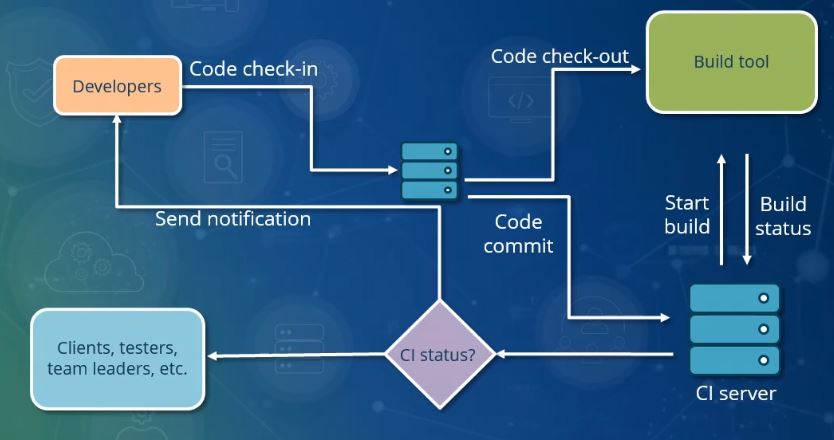
Image: Continuous Integration.jpg — Pratik89Roy (CC BY-SA 4.0), via Wikimedia Commons
5. Continuous Delivery Branch (CDB) with Automated Release Notes
Many senior engineers balk at the manual step of generating release notes. By pairing a dedicated cdb branch with git-cliff (or the built‑in git log --oneline formatter) you can generate a fully automated changelog every time cdb is merged into main.
# CI step on merge to cdb
git fetch --tags
git cliff --tag $(git describe --tags --abbrev=0) --output CHANGELOG.md
# Commit the generated changelog
git add CHANGELOG.md
git commit -m "chore: update changelog for $(date +%Y-%m-%d)"
# Push back to cdb (fast‑forward)
git push origin cdb
The result is a single source of truth for what shipped, ready for publishing to your internal portal or public docs.
6. Temporal Branches for Experiments (TBE)
Feature flags work great for code, but sometimes you need to experiment with build‑time or infrastructure changes (e.g., a new compiler version). Temporal branches are short‑lived, time‑boxed branches that exist only for the duration of an experiment. They are automatically deleted by a scheduled GitHub Actions workflow after a configurable TTL.
# Create a temporal branch with a 48‑hour expiry label
git checkout -b exp/compiler‑upgrade
# Add changes, push
git push origin exp/compiler‑upgrade
# Add a label via API so the cleanup bot knows the TTL
curl -X POST -H "Authorization: token $GH_TOKEN" \
  https://api.github.com/repos/org/repo/issues/$(git rev-parse --abbrev-ref HEAD)/labels \
  -d '{"labels":["temporal:48h"]}'
When the experiment ends, the bot auto‑closes the PR, reverts if needed, and deletes the branch, leaving no trace of stale experimental code.
7. Git‑Ops Driven Infrastructure as Code (IaC) Branching
Infrastructure teams have embraced Git‑Ops, but the pattern of separate repos for app code and IaC can cause drift. The modern approach is to keep IaC files (Helm charts, Kustomize overlays, Terraform modules) in the same repo as the service they provision, using a dedicated infra directory. A git‑ops branch is created for each environment (e.g., gitops/prod, gitops/staging), and an automated Argo CD or Flux controller watches those branches.
# Example file layout
/services/payment/
  ├─ src/
  ├─ Dockerfile
  └─ infra/
      ├─ kustomization.yaml
      └─ helm/
          └─ chart.yaml

# Deploy to prod via git‑ops branch
git checkout -b gitops/prod
# Modify values, commit, push – ArgoCD deploys automatically
This tight coupling guarantees that a change to the service code cannot be merged without a corresponding, version‑matched infrastructure change, eliminating the classic “works locally but not in prod” nightmare.

Image: File:Git log color.png — Der Messer (CC BY-SA 3.0), via Wikimedia Commons
Bottom Line
Advanced Git workflows are no longer “nice‑to‑have” experiments; they are becoming the backbone of high‑performing engineering orgs. By adopting the seven patterns outlined above—FPFT, Incremental Release Branches, Patch‑Queue, MRMS, Continuous Delivery Branches, Temporal Branches, and Git‑Ops IaC—you’ll reduce manual overhead, protect production stability, and empower teams to ship confidently at scale. The key is to start small, instrument the workflow with CI checks, and iterate based on real‑world feedback. In a world where code moves faster than ever, a disciplined Git strategy is the single most effective lever senior engineers have to stay ahead.
Sources & References:
1. GitHub Actions Documentation – https://docs.github.com/en/actions
2. GitLab CI/CD Guide – https://docs.gitlab.com/ee/ci/
3. Argo CD Official Docs – https://argo-cd.readthedocs.io/
4. Flux CD Documentation – https://fluxcd.io/
5. "Git at Scale" conference talks, 2025‑2026 recordings
Disclaimer: This article is for informational purposes only. Technology landscapes change rapidly; verify information with official sources before making technical decisions.